How a Browser Works: A Beginner-Friendly Guide to Browser Internals
What a Browser Actually Is (Beyond “It Opens Websites”)

A browser is not just an app that opens websites. It is actually a smart software system whose main job is to take code written by developers (HTML, CSS, JavaScript) and turn it into something humans can see and interact with on the screen.
When you type a website address and press Enter, the browser starts working like a factory. It talks to servers, downloads files, understands code, applies styles, runs logic, and finally paints pixels on your screen. All of this happens in milliseconds, which is why it feels instant, but inside, a lot is going on.
You can think of a browser as a translator. The web speaks in code, but humans understand visuals. The browser sits in the middle and translates code into a usable web page.
What Happens After I Type a URL and Press Enter?
When you type a URL and press Enter, the browser doesn’t magically show a website. First, it understands the address you typed. Then it goes to the internet, asks a server for files, receives those files, and slowly builds the page on your screen.
You can think of the browser as a builder, and the website files as raw materials. The browser takes those materials and constructs the final page you see.
Main Parts of a Browser (High-Level View)
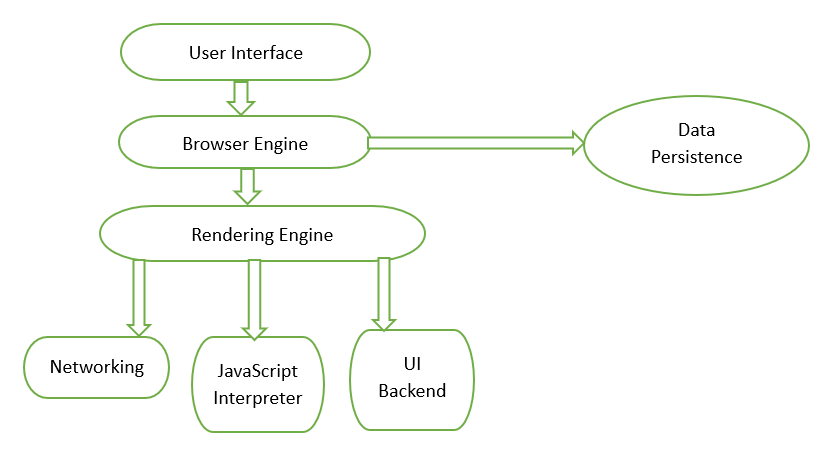
At a high level, a browser is made of multiple parts that work together like a team. One part talks to you, another talks to the internet, another understands HTML and CSS, and another runs JavaScript. Each part has a specific responsibility.
You don’t need to memorize these parts. What matters is understanding that no single part does everything. The browser works smoothly because these components coordinate among them and pass information to each other in a proper way.
User Interface: address bar, tabs, buttons

The user interface is the visible part of the browser. This includes the address bar where you type URLs, tabs for opening multiple websites, back and forward buttons, and settings buttons.
This part does not understand HTML or CSS. Its job is only to take input from you and show output to you. When you type a URL, the UI sends that request to the browser engine and waits for the final page to be ready so it can be displayed.
Think of the UI like the remote control of a TV. Pressing buttons doesn’t create the visuals, it only tells the system what you want to watch.
Browser Engine vs Rendering Engine (Simple Difference)
The browser engine acts like a manager. It connects the user interface with the rendering engine. When you press Enter, the browser engine tells the rendering engine to load the page and display it. The rendering engine is the worker. Its job is to take HTML and CSS and turn them into a page. It builds structures, layouts, applies colors, and draws everything on the screen.
In short, the browser engine decides what should happen, and the rendering engine decides how it should look.
Networking: How the Browser Fetches HTML, CSS, and JS
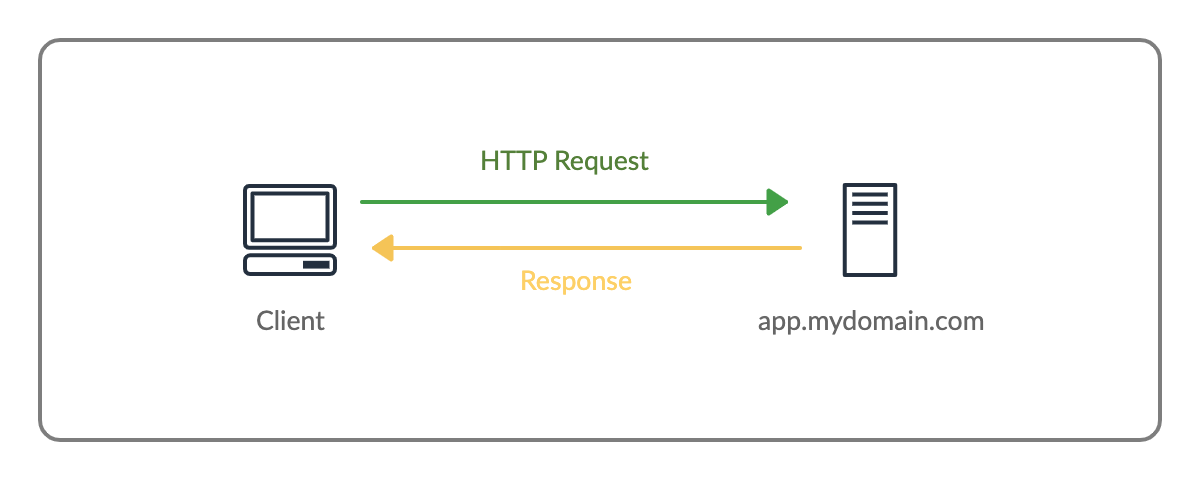
Once the browser knows which website you want, it needs to fetch the files. This is where networking comes in. The browser sends requests over the internet to the server asking for HTML, CSS, JavaScript, images, and fonts. The server responds with these files, and the browser starts processing them one by one. HTML usually comes first, then CSS and JavaScript are fetched as they are discovered.
You can imagine this like ordering food at a restaurant. You place an order, the kitchen prepares different items, and they arrive one after another. The browser doesn’t wait for everything to arrive before starting work t begins as soon as it gets something.
HTML Parsing and DOM Creation

When the browser receives HTML, it doesn’t show it directly. First, it parses the HTML, which means it reads it line by line and tries to understand its structure. From this process, the browser creates something called the DOM (Document Object Model). The DOM is a tree-like structure where each HTML element becomes a node.
You can think of the DOM like a family tree. The <html> tag is the root, <body> is its child, and elements like <div>, <p>, and <button> become branches and leaves. This tree helps the browser understand relationships between elements.
CSS Parsing and CSSOM Creation
CSS is handled in a similar way. When the browser downloads CSS, it parses it and creates the CSSOM (CSS Object Model). The CSSOM is another tree-like structure, but instead of elements, it contains style rules. These rules define colors, fonts, spacing, sizes, and positions.
The browser keeps the DOM and CSSOM separate at first. One represents structure, and the other represents style. Both are needed to build the final page.
How DOM and CSSOM Come Together
Once both DOM and CSSOM are ready, the browser combines them to create the Render Tree. The render tree only includes elements that are actually visible on the screen.
For example, elements with display: none are skipped. The render tree contains just enough information for the browser to know what to draw and how to draw it.
Layout (Reflow), Painting, and Display
During layout (also called reflow), the browser calculates the exact position and size of every visible element. It decides where text should wrap, how wide a div is, and where images should sit. After layout, painting begins. Painting means filling pixels with colors, text, borders, shadows, and images. Finally, everything is displayed on the screen.
Whenever you resize the window or change styles using JavaScript, parts of this process may run again. That’s why painting is a performance-critical step.
A Very Simple Idea of Parsing (Using a Math Example)

Parsing simply means breaking something into pieces to understand its meaning.
Take the expression 2 + 3 × 4. A computer doesn’t see this as a sentence. It breaks it into parts and builds a tree where multiplication happens before addition. Browsers do the same with HTML and CSS. They don’t see text—they see structure and rules. Parsing helps convert raw text into something the browser can work with.