Understanding HTML Tags and ELements
What HTML Is and Why We Use It
What HTML Is and Why We Use It
HTML stands for HyperText Markup Language. It is the basic language used to create webpages. HTML does not add colors, animations, or logic. Instead, it defines what content exists on the page and how that content is structured.
You can think of HTML as the skeleton of a webpage. Just like a human body needs bones to give it shape, a webpage needs HTML to define headings, paragraphs, images, links, and buttons.
Every website you visit Google, YouTube, Instagram starts with HTML. Other technologies like CSS and JavaScript come later to style and control this structure.
What an HTML Tag Is
An HTML tag is a keyword written inside angle brackets < > . Tags tell the browser what kind of content is present. For example, a paragraph tag tells the browser that the text inside it should be treated as a paragraph.
HTML tags usually come in pairs. One tag marks the start, and another marks the end. Together, they wrap around content and give it meaning.
You can imagine a tag like a label on a box. The label doesn’t change the item inside, but it tells everyone what the box contains.
Opening Tag, Closing Tag, and Content
An opening tag looks like <p> and tells the browser where something begins. A closing tag looks like </p> and tells the browser where it ends. Everything between these two tags is the content.
For example, in a paragraph tag, the opening tag says “start a paragraph,” the content is the actual text, and the closing tag says “end the paragraph.”
What an HTML Element Means

An HTML element is the has :- the opening tag, the content, and the closing tag together. A tag is just the marker. An element is the actual thing that appears on the webpage. When we say “a paragraph element,” we mean the full paragraph including its tags and text.
So, tags are like brackets, while elements are like full sentences wrapped inside those brackets.
Self-Closing (Void) Elements
Some HTML elements do not have content. These are called self-closing or void elements. Since there is nothing inside them, they don’t need a closing tag.
Examples include images, line breaks, and horizontal lines.
Block-Level vs Inline Elements
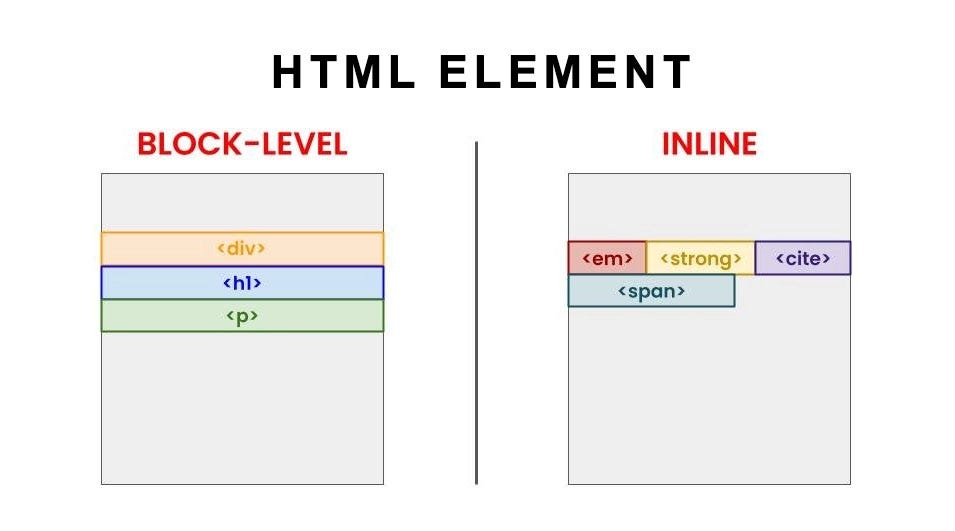
Block-level elements take up the full width of the page by default. They always start on a new line. Examples include headings, paragraphs, and divs.
Inline elements only take up as much space as needed. They stay in the same line as other content. Examples include spans, links, and bold text.
Commonly Used HTML Tags

Some HTML tags are used very frequently. Headings are used for titles and subtitles. Paragraphs are used for text. Divs act as containers to group content. Spans are used to style or target small pieces of text.
Links connect pages together, images display pictures, and lists help organize information. These basic tags are enough to build most webpage structures.